
Align: The Human Design App
JennaZoeEducation
3.3194.00 Reviews
- Version
- 4.0.8
- Installs
- 100.00K
- Age Rating
- Teen
Screenshots
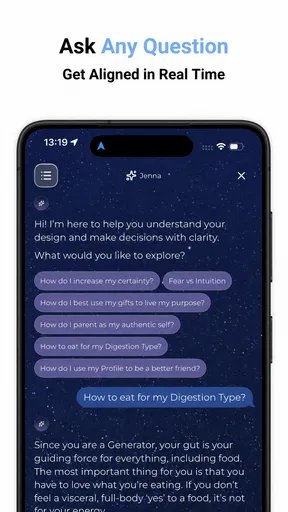
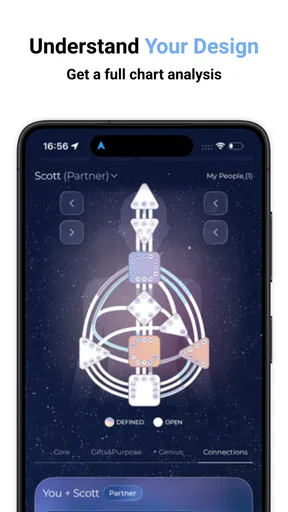
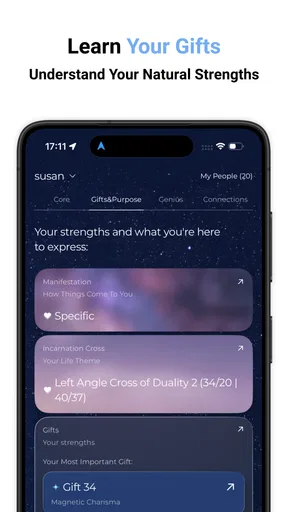
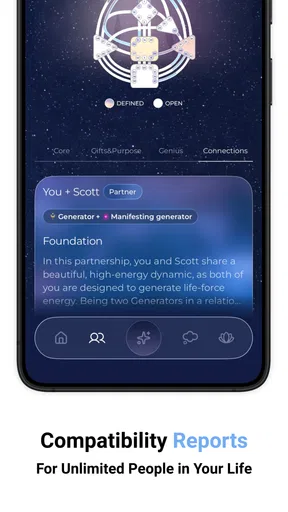
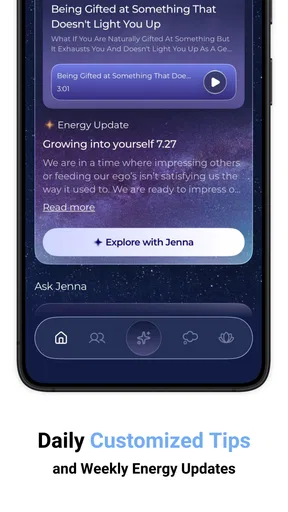
Our Review of Align: The Human Design App
 Analysis by Appyee
I approached Align: The Human Design App as a reflective education tool rather than a typical productivity app. Its focus is Human Design, a system that presents personality, decision-making, and personal patterns through a chart-based framework. The experience is aimed at people who want to explore that framework in a more organized way, especially when they are tired of collecting scattered explanations from social media, videos, and general web searches.
The app comes from JennaZoe and sits in the Education category. It is free to start, with optional in-app purchases priced from $0.99 to $69.99 per item. That combination matters: you can explore the basic experience without paying immediately, but deeper use may lead you toward optional purchases. I would treat it as a guided self-reflection resource, not as a scientific assessment or a substitute for professional advice.
How I used Align in a normal week
My most useful starting point was to avoid trying to absorb everything in one sitting. Human Design terminology can become overwhelming quickly, particularly when several concepts are introduced together. I found it more practical to choose one theme, read the explanation carefully, and then compare it with a real situation from my day. That made the app feel less like a personality quiz and more like a personal study notebook.
A realistic example would be opening the app after a difficult workday. Instead of asking it to explain my entire identity, I would focus on one decision or recurring reaction. Did I agree to something too quickly? Did I ignore a feeling that kept returning? Did I become drained after an interaction? Using the material as a prompt for questions made it more useful than treating every description as a fixed verdict.
This distinction is important. The app can help you notice patterns, but it cannot make choices for you. I would not use a chart reading to decide whether to leave a job, end a relationship, or ignore medical or financial guidance. The healthiest workflow is to read, reflect, write down what seems relevant, and then check whether the idea remains useful over time.
The app is also better suited to gradual learning than to casual tapping. Someone who wants a quick personality label may find the experience too interpretive. On the other hand, a curious user who enjoys journaling, self-observation, or structured spiritual study can get more from it by returning to the same topic in different circumstances.
Because the app is free to download, it is easy to test this approach without committing money at the beginning. I recommend spending several sessions with the available material before considering any optional purchase. That gives you a fair sense of whether the language resonates with you or simply feels vague and difficult to apply.
What the first session gets right
The strongest part of the initial experience is the attempt to turn a broad subject into something you can revisit. Instead of relying on a single inspirational paragraph, I could use the app as a reference point when thinking about decisions, energy, communication, and habits. That repeatable quality is more valuable than a dramatic first impression.
I also appreciated that the subject invites active participation. Reading alone is not enough. I would keep a short note beside the app and record the situation, the idea I was considering, and what happened afterward. After several entries, the material becomes easier to evaluate. You can separate concepts that genuinely help you from descriptions that sound appealing but do not match your life.
One practical tip is to avoid changing your behavior immediately after reading a new interpretation. Give yourself time to observe first. If an explanation suggests that a certain kind of decision process suits you, test it on low-risk choices such as planning an evening, responding to a message, or deciding when to take a break. This keeps the exercise grounded and reduces the risk of turning the app into a rigid rulebook.
Settings and choices worth checking early
My advice is to look through the app’s available options before settling into a routine. The most important setting is not a flashy feature; it is deciding how you want to use the material. You can approach it as spiritual exploration, personal journaling, or a vocabulary for discussing behavior. Being clear about that purpose changes how you interpret the content.
I would also check the app’s presentation preferences and notification choices if they are available on your device. Reflective apps can become irritating when they interrupt at the wrong time, particularly if you are using them for quiet study. A scheduled moment that you choose yourself is usually more effective than reacting to repeated prompts during work or family time.
Another useful habit is to keep your reading scope narrow. If the app presents several areas to explore, select one and return to it rather than opening every section at once. This is especially helpful for newcomers who may otherwise remember isolated terms without understanding how they relate to one another.
Before buying anything, I would examine what the purchase is intended to add and whether it solves a problem you actually have. The optional items range from $0.99 to $69.99 each, so the financial difference between a small experiment and a major commitment is substantial. A purchase makes more sense when you already know that you enjoy the app’s method and will use the added material repeatedly.
I would not buy simply because a description sounds more personal or complete. Ask yourself whether the free experience has already become part of your routine. If you have not returned to it after the first burst of curiosity, paid content is unlikely to change that habit.
Faster patterns for experienced users
Once I understood the basic flow, I found that the fastest approach was not to read more quickly. It was to create a repeatable sequence. I would open the app, choose one topic, connect it to a current situation, write one sentence about the connection, and close it. This kept sessions focused and made it easier to notice whether the material had practical value.
A second pattern is to use the app before a decision rather than only after a problem. For example, before agreeing to an extra responsibility, I could spend a few minutes reviewing the relevant idea and asking what I was actually feeling. The purpose is not to obtain a magical answer. It is to create a pause between the request and my response, which is useful even when the Human Design interpretation remains uncertain.
A third pattern is to compare predictions with outcomes. If a passage suggests that I tend to rush, withdraw, or seek external confirmation, I can record a few real examples instead of accepting the claim automatically. At the end of the week, I can look for repeated evidence. This turns passive reading into a small personal experiment and protects against confirmation bias.
For users who already know the terminology, the app can work as a quick refresher. Rather than beginning at the broadest explanation each time, return to the concept that applies to the situation in front of you. That is where the app becomes more efficient: not as an endless library, but as a prompt you can consult when a familiar pattern appears.
I would also separate learning sessions from emotional crisis sessions. When I am upset, I am more likely to interpret general language as a direct judgment about me. In that moment, a walk, conversation, or practical plan may help more than another reading. I would use Align later, when I have enough distance to think clearly.
Where the app needs a careful approach
The central limitation is the nature of the subject itself. Human Design can be meaningful as a reflective language, but the app should not be treated as an evidence-based diagnostic system. Its explanations may feel personal because they encourage you to connect broad ideas with your experiences. That can be useful, but it can also make general statements seem more precise than they are.
I would be cautious with any interpretation that makes you feel boxed in. A label should not become an excuse for avoiding responsibility, dismissing another person, or refusing to learn a new skill. If an explanation says that a behavior is part of your design, you can still ask whether that behavior is kind, safe, and helpful in the situation.
The average rating is 3.3 from around 740 ratings, with roughly 194 written reviews. I read that as a sign that the app will not suit everyone equally. Some users will appreciate the subject and presentation, while others may find the explanations too abstract, the learning curve too steep, or the paid options difficult to justify. I would set expectations accordingly rather than expecting a universally polished experience.
There is also a practical trade-off between this app and ordinary education alternatives. A book or long-form course may provide more historical context and a clearer progression through the ideas. A general journaling app may be better if your main goal is recording thoughts without being guided by a particular system. A conventional personality assessment may feel more straightforward if you want standardized questions and easily comparable results.
Align makes more sense when you specifically want Human Design material in an accessible mobile format. It is less suitable if you want neutral psychology education, clinical guidance, academic sourcing, or a simple habit tracker. Choosing it for the wrong purpose will make its limitations feel much larger.
Who will get the most from it
I would recommend trying it to someone who enjoys introspection and is comfortable holding ideas lightly. It can be a good companion for journaling, meditation, coaching conversations, or personal goal reviews, provided you remain the final decision-maker. The free entry point makes it reasonable to explore before deciding whether the subject deserves a regular place in your routine.
It may also suit people who have already encountered Human Design elsewhere and want a mobile reference rather than starting from scattered online posts. In that case, the app can help organize curiosity and give you a consistent place to revisit concepts. The benefit is greatest when you already know which questions you want to investigate.
I would skip it if you prefer measurable, testable guidance or become anxious when descriptions feel open to interpretation. I would also avoid using it as a replacement for therapy, medical care, financial advice, or serious relationship communication. Those areas require context, accountability, and qualified support that a reflective education app cannot provide.
Parents should note that the content rating is Teen. That makes it more appropriate for older users than for young children, but age suitability is only one consideration. I would still encourage a teenager to discuss confusing or emotionally heavy interpretations with a trusted adult instead of treating the app’s language as an unquestionable identity statement.
Version, access, and long-term value
The current version is 4.0.8 and it requires Android 9 or later. That is useful to check before planning to install it on an older device. The app has passed the early-experiment stage in the sense that it has attracted over 100K installs, but popularity should not be confused with proof that its interpretations are accurate or that its style will suit you.
For long-term use, I would judge value by whether the app improves the quality of your questions. If it helps you pause, notice a recurring reaction, and make a more deliberate choice, it is doing something worthwhile. If you only collect labels and reread flattering descriptions, the experience may remain entertaining without becoming genuinely useful.
The optional pricing deserves a second look in that long-term decision. A low-cost item may be an easy experiment, while an item near the upper end of the range is a serious purchase for an app in this category. I would never assume that paying more automatically produces better self-knowledge. The best test is whether the content changes how thoughtfully you observe your own behavior.
My verdict after building a routine
Align: The Human Design App is most effective when used slowly, selectively, and with a notebook or another form of reflection. I liked it more as a structured prompt than as an authority. Its strongest quality is that it gives curious users a dedicated way to explore Human Design instead of jumping between disconnected explanations.
It is not the right choice for everyone. The material can feel abstract, the framework may not appeal to users who want conventional educational evidence, and optional purchases require careful judgment. The middling 3.3 average reflects that uneven fit. Still, the free starting point gives interested readers room to decide for themselves.
My recommendation is to begin with short sessions, test ideas against ordinary events, review the available settings, and delay purchases until the habit proves useful. Use the app as a mirror for better questions, not as a rulebook for your life. With that boundary in place, JennaZoe’s education app can become a thoughtful companion for self-observation. Without that boundary, its confident interpretations may carry more weight than they deserve.
Verdict
Strengths of Align: The Human Design App
- Personalized Human Design charts make the system easier to explore.
- Clear explanations help beginners understand complex chart elements.
- Useful for reflecting on habits, decisions, and personal energy patterns.
- Mobile access makes readings convenient wherever you are.
- Can encourage journaling and deeper self-awareness over time.
Limitations of Align: The Human Design App
- Human Design concepts lack strong scientific evidence.
- Some advanced readings or features may require a subscription.
- Interpretations can feel broad or overly general for some users.
- The amount of chart information may overwhelm first-time users.
- Results should not replace professional medical or psychological advice.
Similar Picks in This Category
View All
Duolingo: Language Lessons
Duolingo4.7

Google Classroom
Google LLC2.8

Unacademy: Learn & Crack Exams
Unacademy3.2

Bible App for Kids
Life.Church4.4

Cake - Learn English & Korean
Cake Corp.4.7

Brainly: AI Homework Helper
Brainly4.5
Frequently Asked Questions
What is Align: The Human Design App used for?
Align is designed to help users explore Human Design, a self-reflection system that combines concepts from astrology, the I Ching, chakras, and other traditions. After entering your birth information, the app can present a personal chart and related interpretations. It is best viewed as a tool for reflection, journaling, and learning rather than a scientifically validated method for making important life, health, financial, or relationship decisions.
What information do I need to create my Human Design chart?
You generally need your date of birth, exact or approximate birth time, and birthplace to generate a Human Design chart. The time and location matter because even a small difference may affect some chart details. If you do not know your precise birth time, the app may still offer a reading, but the results can be less accurate within the system. Check the privacy policy before submitting personal information.
Is Align: The Human Design App free to download and use?
Align may be available to download at no initial cost, but some readings, lessons, personalized insights, or advanced features can require a subscription or in-app purchase. Before starting a trial, review the price, billing frequency, renewal terms, and cancellation instructions shown in the store or inside the app. Removing the app does not normally cancel an active subscription, so manage it through your Google Play or Apple account.
Can beginners understand the information provided by Align?
The app is intended to make Human Design easier to explore, but beginners may still encounter unfamiliar terms such as type, strategy, authority, profile, centers, channels, and gates. The explanations and guided content can provide a useful starting point, although interpretation may take time. Read the introductory material carefully, compare related sections, and avoid treating a single result as a fixed description of your personality or future.
Is Align suitable for making personal or professional decisions?
Align can be useful as a personal reflection and self-discovery app, especially when you want prompts for considering habits, communication, energy, or relationships. However, its recommendations should not replace professional advice or your own judgment. Do not rely on a Human Design reading for medical treatment, mental-health support, legal matters, financial choices, employment decisions, or other situations where qualified guidance and evidence are important.
